Posts

Showing posts with the label Teacher Tips

How to Make a Super Cute Cover Page for Your TPT Item! (Flash Giveaway!)

Image
People always ask me if I can make a tutorial for how to make cute cover pages, but I have hesitated to do it because it involves so many different aspects of PowerPoint and so many different tutorials!  I finally worked all of this information into a book, which you can find over a TPT! I reworked a number of my tutorials so that the fit perfectly on letter paper, and I added a number of new tutorials!  This book includes step by step tutorials with pictures on how to make an adorable cover page (just like the one below) in PowerPoint 2007/2010 for PC and PowerPoint 2008/2011 for Mac .  It shows you how to do this without spending any money on clipart (but still abiding by all copyright laws!!!)  Click the picture below to see the book... and grab it tonight only for 25% off! This book includes a number of highly organized and detailed tutorials on all of the following!  It will be useful for people who are new to PowerPoint, and people who are experienced wit...

Great Shopping Deals Year Round (Not Just Black Friday!)

Image
So I know this deal has absolutely nothing to do with teaching... but hey, teachers deserve to get some great shopping deals, right?  And, since today is Black Friday, I'm sure this is the exactly what's on everyone's mind! (Well, it's on my mind at least!) Obviously everyone knows about Amazon, but do you know that you can easily find the price history of any item on Amazon to tell if you're getting a good deal or not?! First things first, head to Amazon, and pull up an item that you are interested in.  I pulled up Avery 5160 Labels... my favorite! :) Copy the link from your address bar (e.g.: http://www.amazon.com/Avery-Address-Labels-Printers-08160/dp/B00004Z5SM/ref=sr_1_2?ie=UTF8&qid=1353641122&sr=8-2&keywords=avery+5160+labels ).  You can copy the link by choosing Edit > Copy, or by doing Control + C on a PC, or Command + C on a Mac. Next, visit the website http://camelcamelcamel.com .  You can head there by clicking the picture below! In the to...

Get Your Students Using Silent Signals & Freebie!

Image
I've heard about the hand signals that teachers all over use, and I absolutely loved the idea, but I wanted to do something a bit different with my class.  I thought back to when I was in elementary school and one of my teachers taught us the pledge in sign language.  I have a second cousin who is deaf and speaks sign language, and I thought it was the coolest thing to learn something that I could use to "communicate" with him.  So... it hit me!  I decided to teach my class sign language! We learned so many different words, and my students constantly asked if we could go to the website Signing Savvy to learn more!  It totally revolutionized my classroom.  Suddenly, everything was sign language.  No longer did students call out "Is it time to erase the board yet?" Instead, they used sign language! Click the pictures below to see an animated video to learn how to sign each of the words, then download the poster at the bottom of the page to post in your ...

Managing Your Computer's Headphones!

Image
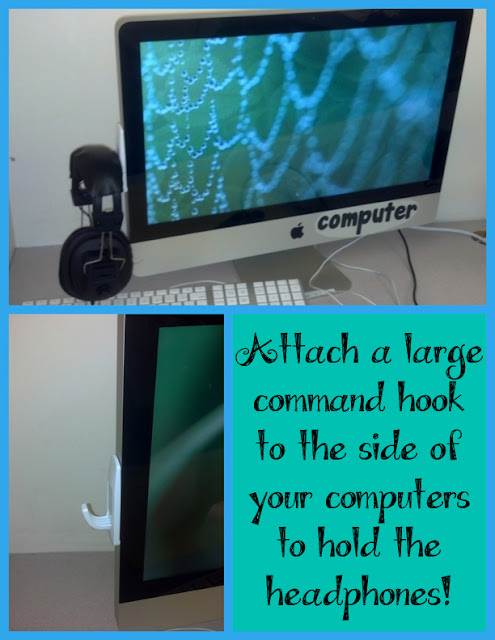
For some reason it drives me crazy how sloppy all the cords around the computers are... and the headphones are always the worst.  They get tangled, they fall down and somehow they get bent and crooked!  For a while, I had my students put their headphones over the computer, but that just made the computer screen get greasy and sweaty, so that habit didn't last too long! Well... I finally had an epiphany: jumbo command hooks! I bought the large command hooks off Amazon - a 3 pack for less than $7... not too bad!  They've held up for about a week now and I love them!  You can click the picture below to see which hooks I bought for my classroom... they seem to be the perfect size for our jumbo headphones!

Help Your Students Remember Everything!

Image
Do your students ever forget that there's a spelling test tomorrow, or do they forget to bring in their homework?  For some reason... mine always seems to forget that they need to bring their snack from home!  Well... I've been thinking about doing this for a while but I finally did it... I came up with a set of "reminder" bracelets to help them remember all the important things they need to do at night! You can grab the spelling test labels for free below!  Click the pictures below to load higher quality versions of the pictures, then save and print them! I originally got the idea of using bracelets from KindergartenWorks .  I absolutely love the set of freebie behavior bracelets that Leslie offers... and I knew my kids would love them!  As the school year started and my class was forgetting simple things (like reading every night), I just knew that adapting her idea would be the perfect solution! ( source ) Be sure to check out her freebie and and follow her...

Sanitizer Trick for Child-Size Squirts!!!

Image
When I decided to try this in class the other day, I immediately kicked myself for not having discovered it sooner!  I took a rubberband that was sitting on my desk and wrapped it around the top of the sanitizer bottle.  I had to adjust it a little bit (I wrapped it a few extra times) to get it to be the perfect amount of sanitizer, but it truly is that... perfect! I was inspired to at do this by this genius pin that recommended using a hair tie on a soap bottle!  I've actually had this pinned for months and never though about using it on a sanitizer bottle before today! Click the picture to see the original pin!

Fun Way to Get Your Kids to Stop Chatting!

Image
This idea is actually a gem that one of my students thought of a few years ago!  One of my classes' favorite YouTube videos was this one... "If You're a Boy" from Harry Kindergarten.  Well... my kids were chatty one day and I said "If you're a boy zip your lips."  One of my girls said "If you're a boy, a boy, if you're a boy zip your lips!"  And so a new tradition was born! When my kids get chatty, all I do is start to sing the song! If they're extra loud, I have them do actions that will get the other students attention (e.g. ones that make them move more or make more noise) such as: pat your legs, jump up and down or clap your hands. If there's only one or two students chatting, I usually do more silent action, such as zip your lips, fold your hands. I actually also use this to get my students to clean up at the end of their writing period.  I break it down step by step for them (since they're kindergarten), so I'll sa...

Get Your Kids To Write Their Name on Their Work!

Image
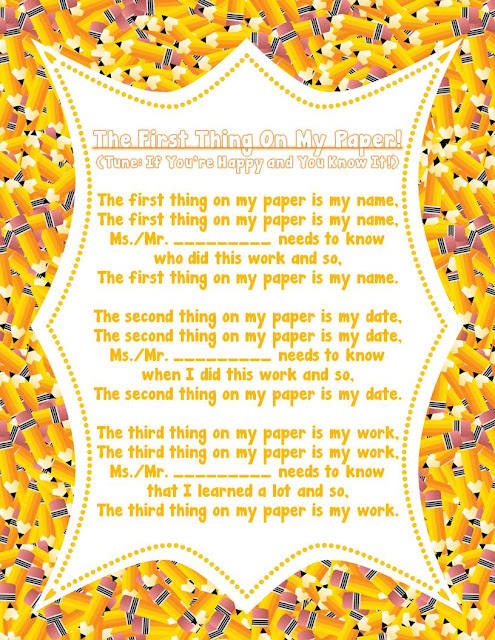
I'm starting to go through my plans for the beginning of the year and I found a bunch of things that I want to add to my blog... and many of them I'll be adding as freebies!  Soo... here's the first freebie!  Years ago I learned the first verse of this song from a preschool teacher at my previous job.  So, my first year teaching Kindergarten, I obviously used it a LOT with my kiddos.  I was absolutely amazed when my students added new verses to the song!  That's right... my students wrote the second and third verses of this song !  I absolutely love how creative they were and I use all three verses with my students nowadays!  I added this file to TPT as a PowerPoint file so you can insert your own name into it, and I even embedded the font into the document so it should load up on your computer perfectly.  I haven't actually done the embedding before so I hope it works! Click the picture below to download the song! How do you get your kiddos to re...

Fight Against Fidgeting!

Image
The number one way I have found to stop kids from fidgeting in class is to let them get all of their energy out another way! I make it a point sporadically throughout the day to do exercise songs in class!  It makes a MAJOR difference it getting kids to sit still the rest of the time! I have a lot of exercise activities that I do with them that are academic in nature, but sometimes we just need a brain break!  I found a ton of songs on YouTube that are just perfect for this! I used my little YouTube trick below to save these videos into a folder on my computer so I can pull them up easily on the Smart Board.  Before you say it... I will: " When am I supposed to have time to do this in class!?  My day is already full! " Most of these songs are 2-3 minutes long... and I know that when my kids fidget I sometimes spend more than 2-3 minutes to get them back on task... so you're not taking extra time to do this, you're just re-purposing your time! Anyway... here are my ...

How To Organize Your Assessment Scores Digitally!

Image
So many of us are used to our spiral grade books, but have you considered using a digital gradebook?  I personally love my having all of my test scores saved digitally that I'll never go back to a paper and pencil grade book! This Technology "Tuesday" tutorial comes from one of the winners of my 500 follower giveaway , Katie.  She requested that I blog about how to use technology to efficiently manage grades, anecdotal records, assessments, etc.!  I personally don't do anecdotes digitially anymore.  I did one year, and I had some issues with it, as one set of parents felt that the fact that the digital anecdotes could have been typed/retyped/embellished at any point without any difficulty.  It really made me think, and now I do it all handwritten!  Anyway, I'm going to blog about how to technology to manage grades/assessments via a digital gradebook! First things first, I uploaded the digital gradebook onto TPT .  There are two options for download, o...

How to Get Better Clipart Results on Google

Image
Hey everyone!  It's time for Technology Tuesday again!  This time, the poll winner was "How to Get Better Clipart Results on Google." This post is separated into five sections: Part 1 : How to get only clipart images to show up Part 2 : How to find a copy of an image without a watermark Part 3 : How to find awesome black and white images Part 4 : How to find high-quality clipart images Part 5 : Other Google Images tricks/tips For those of you keeping track, here are the poll results: Now... onto part 1... how to get only clipart images to show up Now, for part 2, how to find a copy of an image without a watermark. Next is part 3, how to find awesome black and white images.  (This one is my favorite trick!) Now let's do part 4, how to find high-quality clipart images. And, last but not least, here is part 5, some other Google Images tricks/tips. You can download this tutorial as a PDF by clicking this picture! Note: This tutorial is hosted on Google Docs.  To save ...